
How to Submit a Bitmain Warranty Repair Request: A Complete Guide for Mine Mirth LLC Customers
At Mine Mirth LLC, we want to help you protect your mining investment. If your Antminer is experiencing issues, this guide will walk you through checking your warranty and submitting a repair ticket to Bitmain.
Step 1: Check Warranty Status
Before requesting repair, confirm your miner is still under warranty.
- Locate the Serial Number (SN) on your miner’s sticker.
- Visit the Bitmain Warranty Check page:
https://service.bitmain.com/support/warranty - Enter the SN to see remaining warranty days.
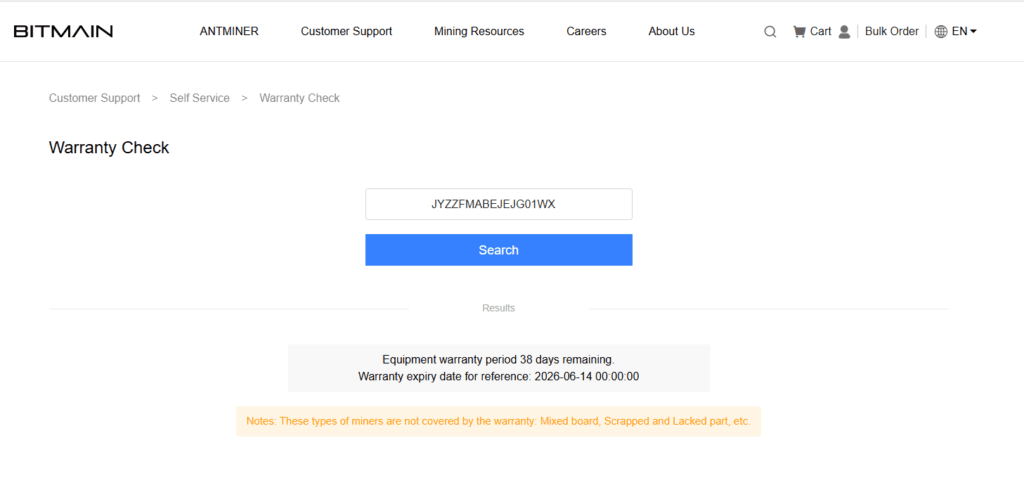
Important: Damaged or unreadable SN stickers void the warranty. Take a clear photo before shipping.
Step 2: Create a Bitmain Account
You must have a Bitmain account to submit a repair ticket.
- Go to the registration page:
https://account.bitmain.com/sign_up - Register using email or phone.
- Log in and navigate to User Center.
Step 3: Diagnose the Issue
Bitmain requires a clear fault description. Vague statements like “miner not working” cause delays.
Recommended approach:
- Log in to your miner’s backend (using its IP address).
- Check the Kernel Log for specific errors (e.g., “chain 0 missing”, “fan lost”, “temp high”).
- Note any troubleshooting steps already taken (e.g., swapped PSU, re-seated cables).
Example remark for your ticket:
“We troubleshooted the miner, checked fans, PSU, and control board, and did not find any issues. The kernel log shows chain 0 is missing.”
Step 4: Create a Repair Ticket
- Navigate to After-Sales Service > My Repair Ticket.
- Click Create a Repair Ticket.
- Select Apply For Repair.
- Click Add Device:
- Type: Select “Unit” for a full miner or “Part” for a single hashboard.
- Item: Select your miner model from the list.
- Quantity: Enter how many units you are sending.
- Remark: Paste your fault description from Step 3.
- Click Confirm.
Step 5: Add Your Shipping Address and Select Repair Site
- Add your return address in the Customer Information section.
- Select the nearest repair site. For USA customers, Bitmain uses:
- USA-Great Voyage (Nashua, NH)
Once selected, you will see the full shipping address.
Step 6: Purchase a Shipping Label and Add Tracking
You are responsible for shipping costs to Bitmain. Bitmain pays for return shipping if the unit is under warranty.
- Purchase a shipping label from a carrier (UPS, FedEx, or DHL). For discounted rates, consider services like ShipStation or Pirate Ship.
- Enter the Tracking Number and Courier Name in the Return Logistics Information section.
Step 7: Review and Submit
- Add any final remarks about the return procedure (optional).
- Check the box: “I have read and agree to After Sales Service Terms”.
- Confirm the pop-up agreement.
- Carefully review all information — especially the shipping address and tracking number — then click Submit.
Step 8: Save Your Ticket Number
After submission, you will receive a unique Ticket ID (example: 03320230817020552948974QIM6M060E).
- Save this number immediately.
- Use it to track your repair status under My Repair Ticket.
Important Notes & Policies
| Issue | Consequence |
|---|---|
| Damaged or missing SN | Warranty voided |
| Scrapped or mixed boards | Warranty voided |
| Sending a bare hashboard without casing | Warranty voided |
| Out-of-warranty units shipped without approval | You pay return shipping or repair fees |
| Shipping from outside the USA to a USA repair site | Package will be returned |
USA Repair Site Restriction: The Nashua, NH facility only accepts shipments from within the USA. International shipments will be returned to sender.
Out-of-Warranty (OOW) Units
If your miner is out of warranty:
- Do not ship it until you receive a repair cost quote.
- Bitmain will charge a diagnostic fee.
- If you decline the repair, you must pay return shipping to receive your unit back.
Contact Mine Mirth LLC for Help
If you have multiple units to repair or find the process overwhelming, Mine Mirth LLC can assist with:
- RMA ticket creation
- Diagnostic verification
- Consolidation and shipping
Contact us today for professional RMA support.
Frequently Asked Questions
Q: How long does the Bitmain warranty last?
A: Typically 180 or 365 days, depending on the product batch. Always check your specific SN online.
Q: Does Bitmain pay for shipping?
A: No — you pay to send the miner to Bitmain. Bitmain pays return shipping for warranty-covered repairs.
Q: Do I need to send the power supply?
A: Yes — if the miner is failing, send the complete unit, including the original PSU. If only the PSU is faulty, send just the PSU.
Q: What happens if Bitmain cannot repair my miner?
A: If under warranty and unrepairable, Bitmain may offer a replacement or credit.