
How to Calculate Power Consumption for Your Mining Setup (2026 Complete Guide)
Quick Summary
- Multiply wattage × 24 ÷ 1,000 to get daily kWh usage
- Add 10–30% to nameplate figures for PSU losses and cooling overhead
- Use the J/TH efficiency ratio to compare miners fairly; lower is always better
- Know your break-even electricity rate before you buy hardware
- Undervolting cuts power draw by 10–15% with minimal hash rate loss
- At $0.10/kWh, a six-GPU rig running 24/7 costs roughly $54–$65/month in electricity
Why Power Consumption Math Is the Foundation of Profitable Mining
Most new miners obsess over hash rate and hardware price. Both matter, but neither tells you whether you’ll actually make money. Electricity is your largest ongoing operating cost, and if you’re not calculating it accurately from day one, you’re making decisions in the dark.
A miner earning $18/day while consuming $14 in electricity isn’t the win it looks like. After hardware amortization, you’re barely breaking even.
In 2026, US residential electricity rates averaged around $0.12–0.16/kWh according to the U.S. Energy Information Administration. Industrial and commercial contracts vary significantly. Meanwhile, the latest ASIC generation, machines like the Antminer S21 XP and Whatsminer M60S, operate at efficiency levels that would have seemed impossible three years ago.
Getting your power numbers right is the difference between a profitable operation and an expensive hobby. Let’s walk through it step by step.
Step 1: Master the Core Units: Watts and Kilowatt-Hours
Before any calculation, you need to be clear on two units:
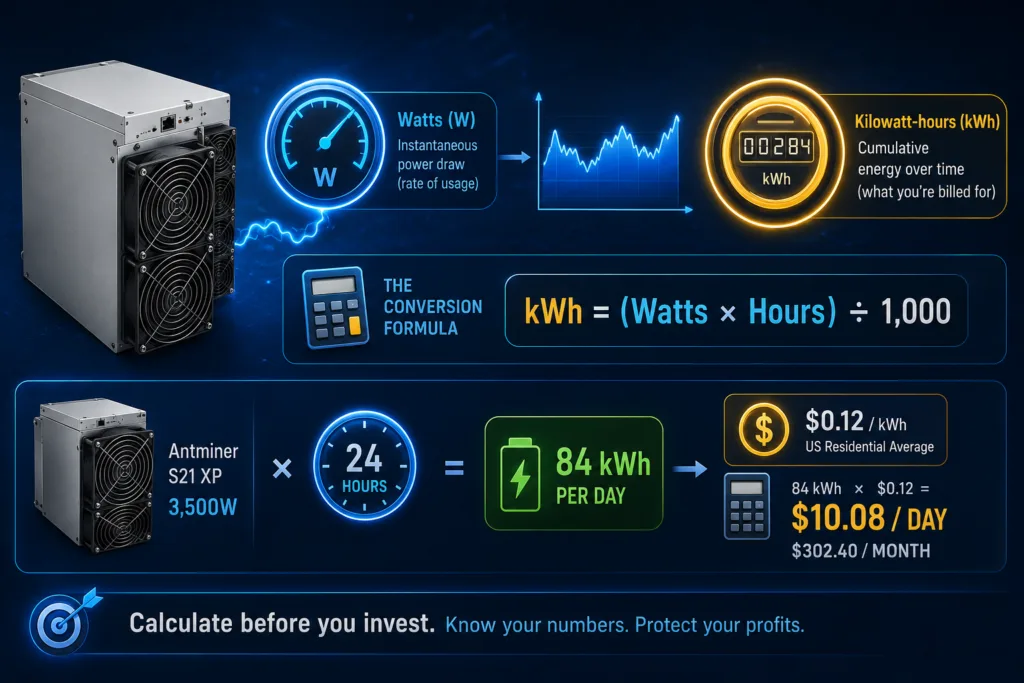
Watts (W) measure the instantaneous rate of power draw, how fast your equipment is consuming electricity at any given moment. Your Antminer S21 XP, for example, draws approximately 3,500W while operating at full load.
Kilowatt-hours (kWh) measure cumulative energy consumption over time. This is what appears on your electricity bill. One kWh equals 1,000 watts sustained for one hour.
The conversion formula:
kWh = (Watts × Hours) ÷ 1,000
For an Antminer S21 XP running continuously for 24 hours:
3,500W × 24 ÷ 1,000 = 84 kWh per day
At the US residential average of $0.12/kWh, that single machine costs $10.08/day in electricity, or $302.40/month. Before you buy any hardware, run this calculation first.
Step 2: Calculate True Wall Power Draw (Not Just Nameplate Wattage)
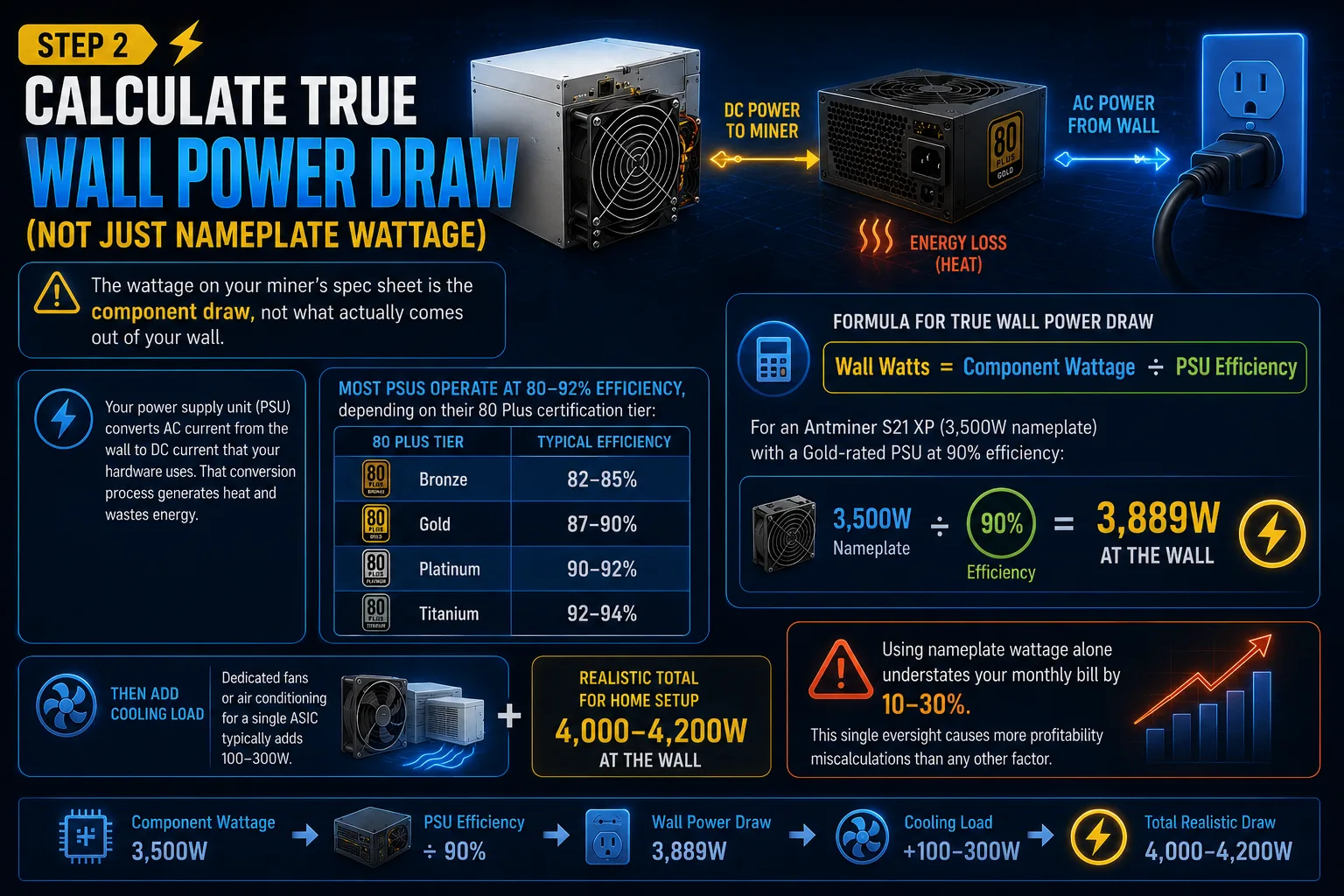
Here’s where most miners underestimate their costs: the wattage on your miner’s spec sheet is the component draw, not what actually comes out of your wall.
Your power supply unit (PSU) converts AC current from the wall to DC current that your hardware uses. That conversion process generates heat and wastes energy. Most PSUs operate at 80–92% efficiency, depending on their 80 Plus certification tier:
| 80 Plus Tier | Typical Efficiency |
| Bronze | 82–85% |
| Gold | 87–90% |
| Platinum | 90–92% |
| Titanium | 92–94% |
Formula for true wall power draw:
Wall Watts = Component Wattage ÷ PSU Efficiency
For an Antminer S21 XP (3,500W nameplate) with a Gold-rated PSU at 90% efficiency:
3,500 ÷ 0.90 = 3,889W at the wall
Then add cooling load. Dedicated fans or air conditioning for a single ASIC typically adds 100–300W. A realistic total for a home setup is 4,000–4,200W.
Using nameplate wattage alone understates your monthly bill by 10–30%. This single oversight causes more profitability miscalculations than any other factor.
Step 3: Scale to Daily, Monthly, and Annual Costs
With your true wall draw established, scaling is straightforward. Using the Antminer S21 XP at 4,000W total draw as the example:
| Period | kWh | Cost @ $0.10/kWh | Cost @ $0.12/kWh |
| Daily | 96 kWh | $9.60 | $11.52 |
| Monthly | 2,880 kWh | $288.00 | $345.60 |
| Annual | 35,040 kWh | $3,504.00 | $4,204.80 |
The calculation:
- Daily kWh: 4,000W × 24 ÷ 1,000 = 96 kWh/day
- Monthly: 96 × 30 = 2,880 kWh
- Annual: 96 × 365 = 35,040 kWh
This is also why location is a structural competitive advantage in mining. Miners with access to cheap hydroelectric power, Quebec at ~$0.06/kWh, Iceland near $0.05/kWh, or Paraguay at ~$0.04/kWh, have a cost floor that most US miners simply cannot compete with on electricity alone.
How to Calculate Power Consumption for a GPU Mining Rig
GPU rigs require summing up every component in the system. Here’s a practical breakdown for a six-GPU rig running undervolted RTX 4070 Super cards:
| Component | Power Draw |
| 6× RTX 4070 Super (undervolted to ~100W each) | 600W |
| Motherboard + CPU | 75W |
| 16GB RAM | 8W |
| 4× case fans | 12W |
| SSD | 3W |
| SUBTOTAL (components) | 698W |
With a Gold PSU at 90% efficiency: 776W at the wall
At $0.10/kWh running 24/7: $1.86/day → $55.80/month
Why Undervolting Changes Everything for GPU Rigs
The RTX 4070 Super has a stock TDP of around 220W. Dropping it to 100W through undervolting cuts your six-card GPU draw from 1,320W to 600W, less than half.
That single optimization saves over $86/month at $0.12/kWh. At the same time, lower temperatures mean quieter fans, reduced thermal stress, and longer hardware lifespan. It’s the highest-leverage optimization available to GPU miners.
For ASIC undervolting, firmware tools like BraiinsOS+ (for Bitmain hardware) offer autotuning that finds the optimal voltage/frequency curve for each individual chip.
The J/TH Efficiency Ratio: The Metric That Actually Tells You Which Miner to Buy
Once you understand how to calculate power consumption, the next step is comparing miners on equal terms. That’s what J/TH (joules per terahash) does.
J/TH measures how much energy a miner consumes to produce one terahash of SHA-256 work. Lower is always better. A miner at 13.5 J/TH is meaningfully more efficient than one at 18.5 J/TH, even if their hash rates look similar at first glance.
Here’s how the leading 2026 ASIC miners compare:
| Miner | Hash Rate | Power Draw | Efficiency |
| Antminer S21 XP (air) | 270 TH/s | 3,645W | 13.5 J/TH |
| Antminer S21 XP Hyd | 473 TH/s | 5,676W | 12.0 J/TH |
| Antminer S21 Pro | 234 TH/s | 3,510W | 15.0 J/TH |
| Whatsminer M60S | 186 TH/s | 3,441W | 18.5 J/TH |
| Whatsminer M66S++ (immersion) | 356 TH/s | 5,518W | 15.5 J/TH |
The S21 XP Hyd leads on efficiency at 12 J/TH but requires full hydro-cooling infrastructure. For most home and small-scale miners, the air-cooled S21 XP at 13.5 J/TH is the practical benchmark in 2026.
Daily Power Cost Per TH: The Comparison Formula
Daily cost per TH = (J/TH × 86,400 ÷ 1,000,000) × electricity rate
For the S21 XP at $0.10/kWh: 13.5 × 86,400 ÷ 1,000,000 × $0.10 = $0.117 per TH per day
Run this calculation for any two machines to compare them on equal footing, regardless of hash rate or price differences.
At What Electricity Rate Does Mining Stop Being Profitable?
This is the question that determines whether you should mine at all, and most guides skip it entirely.
The break-even electricity rate is the point where electricity cost equals mining revenue. Above it, you’re losing money per kWh. Below it, you’re in profit.
For the Antminer S21 XP under mid-2026 network conditions (Bitcoin difficulty ~110T, BTC price ~$96,000, block reward 3.125 BTC), estimated daily revenue sits around $15–17. With a true wall draw of ~4,000W (including cooling), daily consumption is 96 kWh.
Break-even rate = $16 ÷ 96 kWh = ~$0.167/kWh
This means the S21 XP breaks even on electricity alone at around $0.16–0.17/kWh. Once you factor in hardware amortization (typically 2.5–3 years at $0.07/kWh), the effective all-in break-even drops to $0.10–0.12/kWh.
If your electricity rate is above $0.12/kWh, explore your options before committing capital. Tools like WhatToMine and ASIC Miner Value let you stress-test your numbers against current network conditions in real time.
6 Practical Strategies to Lower Your Power Bill
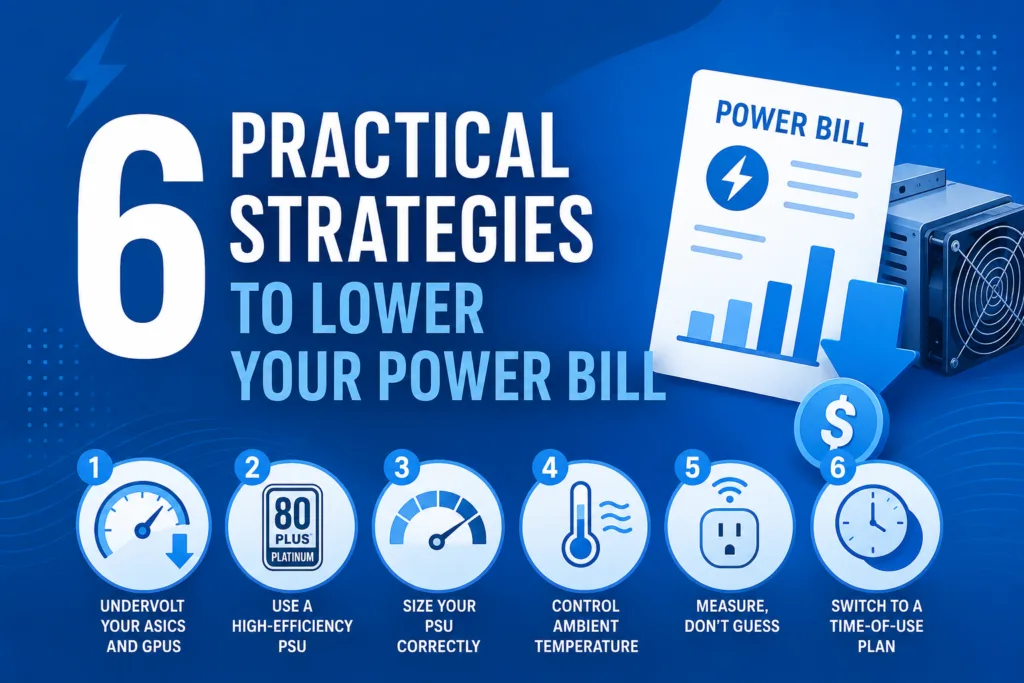
1. Undervolt Your ASICs and GPUs
A 5–10% voltage reduction typically cuts power draw by 10–15% while maintaining 95–100% of hash rate. Use BraiinsOS+ for Bitmain miners or your GPU manufacturer’s software for RTX cards. Always test in stages and monitor for 24 hours after each adjustment.
2. Use a High-Efficiency PSU
The gap between an 80 Plus Bronze (82%) and Platinum (92%) PSU is real money. On a 2,000W load running 24/7, that 10% difference costs ~$175/year at $0.10/kWh. Check certified product listings before buying.
3. Size Your PSU Correctly
A PSU operating at 60–80% of rated capacity runs at peak efficiency. Running above 95% degrades efficiency and shortens lifespan. If your rig draws 1,200W, choose a 1,600–1,800W PSU.
4. Control Ambient Temperature
Every 10°C rise in ambient temperature can push ASIC power draw up 3–5%. A well-ventilated or climate-controlled space directly reduces electricity costs, often overlooked in home setups where miners run in enclosed rooms.
5. Measure, Don’t Guess
Use a smart plug with energy monitoring (such as the Emporia Vue) to get real-time kWh data. It catches consumption spikes from failing components and validates your calculations against actual wall draw.
6. Switch to a Time-of-Use Electricity Plan
Many utilities charge significantly lower rates during off-peak hours (typically overnight). Some US miners have dropped their effective rate from $0.13/kWh to $0.08/kWh simply by shifting load to off-peak windows. Check your utility’s TOU rate options; the savings can be substantial.
Can Solar Power Offset Mining Electricity Costs?
Yes, and in 2026, more small-scale miners are making this work. A 10kW solar array generates roughly 40–50 kWh per day in a sunny climate, which can fully offset a mid-range ASIC’s consumption during daylight hours.
The economy depends on:
Your installation cost and available federal/state incentives
Local net metering rules, check your state via DSIRE
- Whether you can run miners primarily during peak solar generation hours
Pairing solar with battery storage extends zero-cost mining into evening hours, but significantly increases upfront capital requirements. Run the numbers carefully before assuming solar makes mining profitable at high-electricity-cost locations.
Frequently Asked Questions
How do I calculate the daily electricity cost for my mining rig?
Multiply your rig’s true wall wattage by 24 to get watt-hours, divide by 1,000 to convert to kWh, then multiply by your electricity rate. Example: 2,000W × 24 ÷ 1,000 × $0.10 = $4.80/day. Always use the measured wall drawing, not the spec sheet figure, for accuracy.
What is a good electricity rate for Bitcoin mining in 2026?
Below $0.08/kWh puts you in a strong competitive position. Between $0.08–$0.12/kWh is workable with efficient hardware. Above $0.12/kWh, profitability becomes marginal for most setups. Industrial miners in hydroelectric regions often secure rates of $0.03–$0.06/kWh, which is why geography is as important as hardware selection.
Does undervolting an ASIC reduce hash rate?
A modest 5–10% voltage reduction typically preserves 95–100% of hash rate while cutting power draw by 10–15%. More aggressive undervolting can cause instability or a dropped hash rate. Always test in stages and monitor for over 24 hours after each adjustment.
How much power does a six-GPU mining rig use?
A typical six-GPU rig running undervolted RTX 4070 Super cards draws around 750–900W at the wall (all system components included). At $0.10/kWh running 24/7, that’s roughly $1.80–$2.16/day or $54–$65/month. Stock (non-undervolted) settings can push that to 1,600–2,000W, more than doubling your electricity bill.
What is J/TH, and why does it matter?
J/TH (joules per terahash) measures how much energy a miner consumes to produce one terahash of hashing work. Lower means more energy-efficient. In 2026, the best air-cooled ASICs operate at 13.5–15.0 J/TH; hydro-cooled models reach 12.0 J/TH. When comparing two miners, J/TH is more useful than raw hash rate because it accounts for the cost of generating that hash rate.
How do I determine what PSU size I need?
Sum the wattage of every component (GPUs, CPU, motherboard, RAM, fans, storage), then divide by your target load factor (0.7–0.8 is ideal). If components draw 1,400W total, you need at least a 1,750–2,000W PSU. Running at 60–80% of rated capacity maximizes efficiency and extends PSU lifespan.
What tools can I use to calculate mining profitability?
WhatToMine covers both GPU and ASIC profitability with adjustable electricity rates. ASIC Miner Value focuses on ASIC hardware comparisons. NiceHash Profitability Calculator is useful for GPU miners. Run your numbers across multiple tools and check them weekly; mining economics shift constantly.
Have questions about hardware selection, power optimization, or mining setup? The team at Mine Mirth is here to help, whether you’re buying your first miner or scaling an existing operation.