

How Much Can You Make Renting Your GPU for AI in 2026?
For many of us, the first real obsession in this space was not Bitcoin. It was GPU mining Ethereum. If you came up as a gamer, the realization that the same graphics cards you obsessed over could earn passive income overnight hit like a lightning bolt. Building those rigs was a genuine craft, seating cards into frames, routing riser cables, dialing in PSU sizing, then watching a fresh rig boot and start hashing for the first time. ETH mining at its peak was this hobby at its most electric.
Then, Ethereum moved to proof of stake. The hashing era ended. A lot of that hardware went quiet, got flipped, or gathered dust in a closet.
Fast forward to now, May 2026. Over the past few months, we have been fielding the same question from the community: “Can I actually make money with GPUs doing AI stuff?”
The short answer is yes. The mechanism is simply different. You are no longer solving hashes. Instead, you are renting raw compute to developers and companies that train and run AI models. This guide covers exactly how that works, realistic earnings, which cards are worth buying, a full budget breakdown, and where to list your hardware so it actually gets rented.
Why This Wave Is Real, and Different From Mining
The demand side of AI compute is genuinely supply-starved right now, and that changes the math for anyone with idle GPU horsepower.
A few hard facts shaping the landscape in May 2026:
- AI companies are pouring well over half a trillion dollars into infrastructure this year, and GPU demand massively outpaces available supply.
- NVIDIA has cut consumer GPU production by roughly 30–40% to redirect wafer capacity and memory toward data center chips.
- A global GDDR7 and high-bandwidth memory shortage has pushed memory toward 80% of a high-end card’s bill of materials, with prices climbing sharply through the first half of the year.
- RTX 5090 cards that launched at $1,999 are now regularly selling above $3,000, with some variants pushing far higher on the secondary market.
Put simply, there are not enough GPUs to go around, and that is precisely what makes an idle card valuable. Every GPU sitting unused right now has paying tenants lined up for it.
Here is the important distinction for anyone coming from the mining world. This is not the same risk profile. There is no halving quietly eroding your reward, no difficulty bomb killing your margin overnight, no surprise consensus change that retires your entire setup. Demand here comes from real businesses that need to train and serve AI models continuously.
That said, it is not risk-free. A new GPU generation can drag down rental rates for older hardware, and your earnings fluctuate with marketplace demand. It trades one set of risks for another, and in our view, that trade is a favorable one.
The clearest proof is who is already doing it. Established crypto mining channels like VoskCoin and Red Panda Mining are openly converting farms to AI compute. When the people who built and rode the last GPU wave are repositioning hard for this one, the signal is worth paying attention to.
Renting Your GPU vs. Renting *a* GPU: Get This Straight First
The phrase “GPU rental” covers both sides of the same market, and it trips people up constantly.
You want to be the host, also called the supplier or provider. You own hardware, you list it on a marketplace, and customers pay you for the compute hours they consume. The other side (the renter or customer) is the AI developer or company borrowing your compute. This entire guide is written from the host’s perspective.
What do renters actually do with your card?
- Inference: Running already-trained models, chatbots, AI APIs, agents. Steady, bread-and-butter demand.
- Image and video generation: Stable Diffusion, Flux, and similar tools, often at scale.
- Fine-tuning: Adapting a smaller language model to a specific task or dataset.
- Batch jobs and rendering: Transcription, data processing, 3D rendering pipelines.
Your card does not care which workload it is running. You provide the compute and get paid for the uptime.
The Honest Math: What Can You Realistically Make?
Transparency first, because overselling this helps nobody.
The earnings figures platforms advertise are gross revenue. Your real take-home is what remains after costs quietly eat into that number. The formula looks like this:
Monthly net = (hourly rate × hours per day × 30 × utilization %)
              − electricity
              − GPU depreciation
              − platform fee (roughly 15–25%)
Those hidden costs together typically swallow 30–65% of gross, depending mostly on your local electricity rate. Here is a realistic picture of monthly net profit per card, based on current market data at roughly the US average power rate of $0.12/kWh.
| GPU | VRAM | Realistic Net/Month | Notes |
|---|---|---|---|
| RTX 3080 | 10 GB | ~$8 | Barely clears costs. Not worth buying for this purpose. |
| RTX 4080 / 5070 Ti class | 16 GB | ~35–45 | Strong for image generation and small LLMs. Lower buy-in. |
| RTX 3090 | 24 GB | ~$40 | Solid value if you already own one. |
| RTX 4090 | 24 GB | ~50–60 | The profit-to-cost sweet spot. |
| RTX 5090 | 32 GB | ~$85 | Highest consumer earner, highest demand. |
| A100 80 GB | 80 GB | $400+ | A different league entirely. Requires $15,000+ in capital. |
The Single Biggest Variable: Your Electricity Rate
This is not the card you chose. It is your power cost.
At cheap-power rates, think Texas or the Midwest at around $0.08/kWh, an RTX 4090 nets noticeably more, closer to $60 and up per month.
At expensive rates found in parts of Europe ($0.30/kWh and above), that same card barely breaks even or loses money.
The rule of thumb:
Under $0.15/kWh, you have real margin.
Over $0.25/kWh, the economics for consumer cards become very difficult.
Know your rate before you buy anything.
A Real-World Gut Check
For grounding, consider publicly posted dashboards from operators on Vast.ai in May 2026. Verified RTX 5090 machines are averaging around $9/day (roughly $270/month), and verified RTX 4090s are pulling around $6/day each.
These are gross figures, before electricity costs and platform fees, so treat them as a top line, not take-home.
Here is the number that matters most in that data:
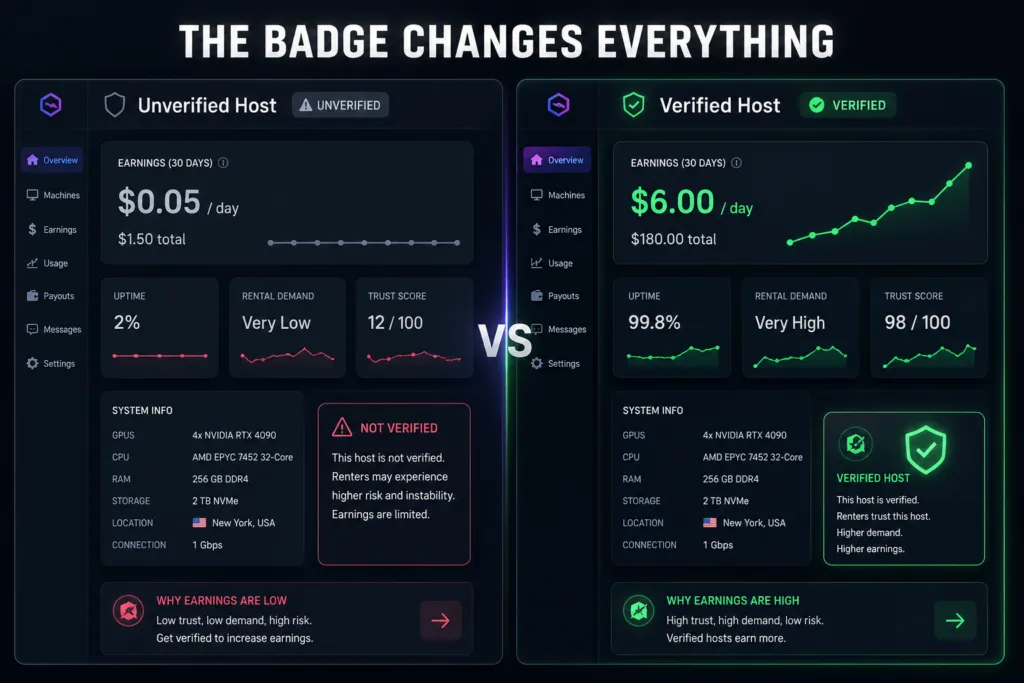
Sitting right next to a verified RTX 4090 earning $6/day was an unverified RTX 4090 at the same asking price, making just $0.05/day.
Same card, same price, separated only by a verification badge.
More on that gap further below.
The Honest Verdict on a Single Card
A single GPU is side income, the kind that covers its own running costs and a bit more. The real money in this, exactly like mining always worked, is scale and better hardware. A four-to-six GPU AI rental rig changes the math entirely.
There is also a return that is easy to overlook: because of the structural supply shortage, the cards themselves are holding or gaining value while they earn. Your hardware may be appreciating, not just depreciating. That almost never happened in the mining era.
Which GPUs Are Best for AI Rentals?
Two specifications matter above everything else: VRAM (how large a model the card can hold) and memory bandwidth (how fast it produces output). CUDA core counts and clock speeds are secondary for rental workloads.
The single most useful number to anchor on is 16 GB. That is the practical floor for a card that will keep earning over the next two to three years. 24 GB and above gets you into the largest, highest-paying jobs. Below 12 GB, you are largely locked out of meaningful demand.
The 24 GB and Up Tier: Headline Earners
RTX 5090, The Flagship
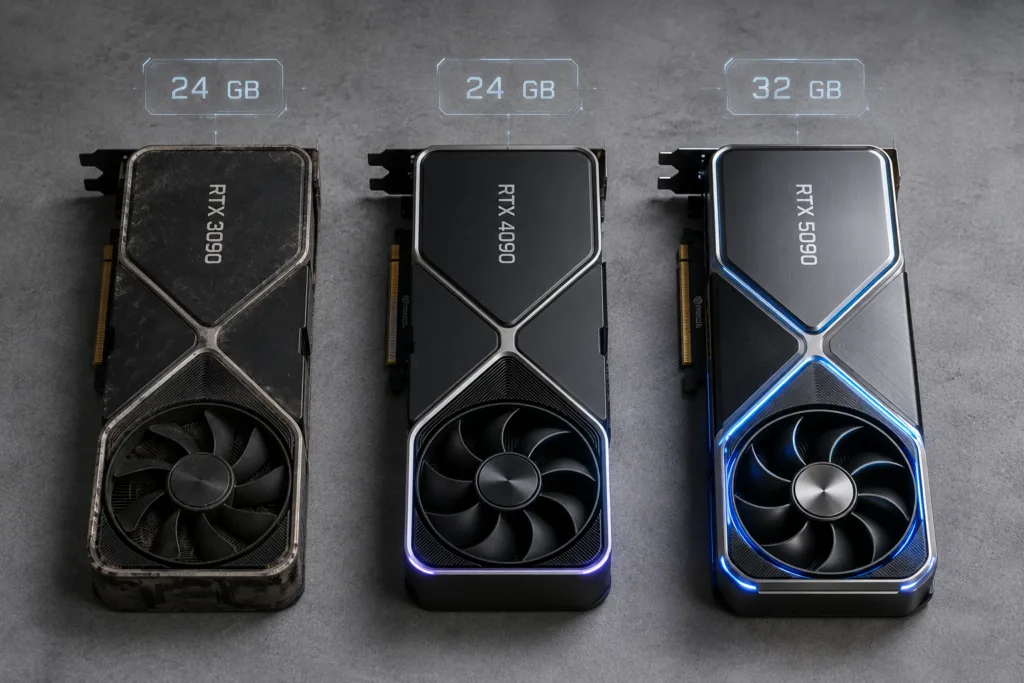
The current king of consumer AI rental. Blackwell architecture, 32 GB of GDDR7, approximately 1,790 GB/s of bandwidth (a 77% jump over the 4090), and native FP4 support. That 32 GB is the headline number, it is the only consumer card that cleanly runs 32-billion-parameter models at Q4 quantization with room left for context. It earns the most and is the most in demand.
The downsides are real: 575W power draw, requires a 1,000W or larger PSU with the proper connector, and genuinely hard to find at a reasonable price right now.
RTX 4090, The Sweet Spot
If you are speccing a rental rig today and value matters, this is the anchor. 24 GB of GDDR6X, runs 32B models at Q4, rock-solid mature driver support, and always in demand on the major marketplaces. It does not earn as much per card as the 5090, but its profit relative to purchase price is the best in the lineup. For most people building their first AI rental setup, the 4090 is the answer.
RTX 3090, The Value Veteran
Often overlooked. The 3090 carries the same 24 GB of VRAM as the 4090, runs roughly 15–20% slower on inference, and sells used for approximately half the price of a 4090 on eBay or r/hardwareswap. For rental purposes, VRAM parity is what matters, 24 GB is the practical floor for attracting premium jobs. One real caveat: the 3090’s memory modules run hot under sustained load. Budget for better cooling and fresh thermal pads. This is the budget MVP of the lineup.
The 16 GB Tier: Smart-Money Middle Ground
A 16 GB card will not run a 32B language model, but it comfortably handles 7–13B model inference and, critically, image and video generation, including Stable Diffusion XL and Flux. Image generation is one of the largest and steadiest demand categories on rental marketplaces, and a 16 GB card handles it well. These cards often break even faster than a 5090 on a pure payback basis despite earning less per day.
RTX 5070 Ti, Mid-Tier Sweet Spot
16 GB of GDDR7, Blackwell features including FP4 support, only 300W power draw, and priced meaningfully below the 5080. The best balance of buy-in, power efficiency, and earning in the middle of the stack.
RTX 4080 and 4080 Super, Strong If You Can Find One
Historically excellent payback periods, but the 40-series is out of production. Stock is thinning and prices have firmed on Newegg and Best Buy. Worth grabbing at a fair price; not worth overpaying for.
RTX 5080 – Capable but Overpriced for Rentals
The 5080 delivers the same 16 GB of VRAM as the 5070 Ti at a noticeably higher price. For AI rental workloads, VRAM sets your ceiling, not raw throughput. Unless 5080 pricing corrects, the 5070 Ti is the smarter choice.
12 GB and Below: Tread Carefully
The RTX 4070 and RTX 5070 ship with 12 GB. They technically list on marketplaces, but demand is thin and rates reflect that. Treat them as experimentation hardware, not income hardware.
Cards with 8 GB of VRAM, including the RTX 5060, RTX 4060, and the 8 GB 5060 Ti, are not worth listing for AI rentals. 8 GB cannot run SDXL at full resolution or hold a useful language model. It simply will not attract paying jobs.
Fewer Expensive Cards, or More Cheaper Ones?
The honest tradeoff breaks down like this:
24 GB and up cards: More capital per unit, bigger risk if one fails. In exchange: access to every job category, higher utilization, higher rates, and hardware that is appreciating in today’s shortage, which itself softens the downside of a failure.
16 GB cards: More units for the same budget, less exposure per card, built-in redundancy. The cost is lower utilization and thinner job demand. Three 16 GB cards will not reliably out-earn two 4090s the way the sticker math suggests.
Our take: if you have cheap power and want maximum return per rig, anchor on 24 GB cards. If you prefer lower concentration risk or a more accessible entry point, a 16 GB build anchored on the 5070 Ti is a sound call. Neither choice is wrong, only the one that does not fit your risk tolerance.
The Budget-Friendly Path: Best Bang for Your Buck
Not everyone is dropping $3,000+ on a 5090. You do not need to.
Best budget pick: Used RTX 3090
The standout value in this space. Full 24 GB of VRAM at roughly half the cost of a 4090. Spend a portion of what you save on improved cooling, the VRAM thermals are a known issue, and it will run reliably around the clock. If you are buying specifically to rent on a tight budget, two used 3090s will out-earn one mid-tier new card and give you redundancy as a bonus.
Entry ticket: RTX 4060 Ti 16 GB (~$399)
This card lets you learn the platforms before committing real capital. It handles 7–8B parameter models and SDXL fine. Be honest with yourself: its bandwidth is limited, demand for 16 GB cards is thinner, and the rates reflect that. Treat any income from it as tuition money, not a paycheck. It is a great way to understand how verification, pricing, and job routing actually work before you scale.
What to skip entirely: Cards in the 10–12 GB range like the RTX 3080 technically qualify on most platforms but barely break even after electricity, depreciation, and fees. Only run one if you already own it and your power is cheap. Anything older than the 3000 series, or under 10 GB of VRAM, is not worth the time. The combination of an outdated CUDA generation and small VRAM locks you out of most paying jobs.
The smartest budget move is not the cheapest single card. Suppose actual income is the goal, put two used 3090s to work. Same 48 GB of combined VRAM capacity as two 4090s at a fraction of the outlay, and you are diversified if one card has an issue.
Where to Rent Your GPU: Platform Breakdown
Choosing the right platform is half the game.
Vast.ai – The Big Marketplace
The largest GPU rental marketplace and where most serious hosts eventually land. You set your own price, the platform fee is the lowest of the main options (roughly 10–15%), and demand is broad. It is more hands-on than alternatives, and there is one non-negotiable step: get verified. Verified listings attract jobs; unverified listings mostly sit idle. If you want maximum control and maximum net earnings, this is the platform to prioritize.
RunPod – The Standardized Option
Think of RunPod as Vast.ai with more guardrails. Pricing is more standardized, the environment is more consistent, and there is less to manage on your end. Net earnings come in a close second to Vast.ai. A good choice if you want fewer moving parts.
Salad – The Easiest On-Ramp
Built for the gamer and hobbyist crowd. A simple desktop app, genuinely the lowest-effort way to start. The trade-off: it pays the least and pays out in “balance” redeemable for gift cards or crypto rather than direct bank transfers. Worth knowing: some workloads on Salad include adult content generation, and you can opt out in the settings if that matters to you.
io.net and Render Network, The Crypto-Native Route
These will feel familiar if you come from mining. Decentralized compute networks that actively recruit miners and idle rigs, paying in their own tokens or USDC. The familiar territory is a plus. Just go in with clear eyes, getting paid in a platform token means taking on that token’s price volatility.
Most experienced hosts list on two or three platforms simultaneously and route idle capacity to whichever has demand. Check each platform’s terms first, since a few require exclusivity.
Setting Up and Maximizing Your Earnings
The platforms make joining straightforward. Earning well takes discipline. The hosts who consistently out-earn everyone else all do the same handful of things.
Do Not Starve Your GPU: The Supporting Rig
The graphics card is the headliner, but it does not run alone. The CPU, RAM, and storage around it will not earn you an extra dollar, but get them wrong and they will quietly cost you money. Marketplaces like Vast.ai benchmark your entire machine, and renters filter on those full-system specs. Build the supporting cast so it never bottlenecks the star:
- System RAM: At minimum, match your GPU’s VRAM. Ideally 1.5–2× it. A 24 GB card wants at least 32 GB, with 48–64 GB comfortable. A multi-GPU rig should cover every card’s VRAM plus headroom, so plan for 128 GB or more.
- CPU: A modern mid-range chip is sufficient. What matters is core count, each GPU’s workload needs threads feeding it. Scale cores up as you add cards. Look at AMD Ryzen 9 or Intel Core i7/i9 tiers.
- Storage: A fast NVMe SSD is close to mandatory. Renters download large datasets and model weights onto your machine, and slow disk drags the entire job. Budget for at least 1 TB of NVMe.
- Power supply: On a 24/7 rig, this is a reliability and safety decision. Use a quality unit from Corsair, EVGA, or Seasonic with real headroom above your total system draw. On 4090 and 5090 builds, seat the 12VHPWR connector fully every single time, a partially seated connector is a genuine fire risk.
Verification Is the Difference Between Real Money and Almost Nothing
If there is one operational lesson to take from this entire guide, it is this. On Vast.ai, your machine must pass the platform’s checks and build a track record before earning a verified badge. Until it does, two things quietly kill your earnings: the marketplace ranking pushes your listing down, and most renters filter for verified hosts only, meaning you are invisible to them.
The gap is severe.
A verified RTX 4090 earns around $6/day. An unverified RTX 4090 at the same asking price earns around $0.05/day.
That is identical hardware earning either approximately $180/month or just $1/month, decided entirely by a badge.
Treat verification as step one, before any pricing tweaks or optimizations. And if you are scaling into a multi-GPU rig, every single card must clear verification independently. Budget your first few weeks expecting near-zero income and push to get your full fleet verified as quickly as possible.
Everything Else That Matters
- Hardware checklist: A 24 GB (or larger) NVIDIA card, ideally, a stable upload connection of 50 Mbps or more, Linux preferred (Windows works), Docker support, real PSU headroom, and cooling that keeps the card under 80°C sustained.
- Use a dedicated machine. Do not rent out your daily gaming rig. Uptime is everything to marketplace ranking algorithms, and a shared machine cannot deliver it.
- Price to win first, then raise. List slightly below the market rate for your card tier to attract early jobs and build a reliability score. Once your reputation is established, nudge the price up.
- Protect your uptime. Aim for 95%+ during your listed hours. A UPS to ride out brief power blips is cheap insurance for your ranking.
- Be patient with month one. Expect roughly 30–40% of your steady-state earnings in the first month while the platform learns you are reliable. Things typically stabilize around month three.
- Keep the basics current. Monitor temperatures with HWMonitor or NVIDIA-smi, keep NVIDIA drivers updated so you stay compatible with incoming jobs, and note that this is taxable income. Track electricity, depreciation, and internet costs, they are deductible. Consult IRS Publication 535 for business expenses.
So, Is Renting Your GPU for AI Worth It?
It depends on your situation. Here is the honest breakdown:
You already own a 3090, 4090, or 5090 and your power is cheap: Yes, easily. This is close to free money on hardware that would otherwise sit idle.
You game on that card daily and pay $0.30/kWh: Probably not. The wear and power cost will not be worth the modest return.
You want this to be real income: Think in rigs, not single cards. A four-to-six GPU AI rental setup is where the numbers get genuinely interesting, the same dynamic that made mining reward scale.
You just miss the rig-building days: This is the closest thing we have to that era, with one meaningful improvement: the hardware holds its value far better than it ever did in mining, because the shortage driving prices is structural rather than speculative.
Closing Thoughts
The same instinct that made building ETH rigs so satisfying is back, it is just pointed at AI compute now. The difference is that this time, the demand comes from real businesses, the hardware is appreciating rather than bleeding value, and there is no halving clock to chase.
At Mine Mirth LLC, this is exactly why GPU questions have dominated our inbox lately, and it is exactly the kind of opportunity we exist to help people navigate. Whether you are speccing your first card or building out a multi-GPU rental rig, the fundamentals in this guide give you a realistic foundation to start from.
Run the numbers for your own electricity rate, start with verification as your first priority, and build from there.